
🧪 How to Test Forex Robots
Complete Testing Guide & Best Practices
This comprehensive testing guide will teach you how to properly evaluate forex robots before risking real money. You'll learn backtesting, forward testing, demo validation, and live trading protocols to ensure your EA performs as expected in real market conditions.
📋 Table of Contents
- Testing Philosophy & Approach
- Pre-Testing Setup
- Phase 1: Backtesting
- Phase 2: Forward Testing
- Phase 3: Demo Validation
- Phase 4: Small Live Test
- Performance Metrics Analysis
- Optimization vs Validation
- Common Testing Mistakes
- Advanced Testing Techniques
- Testing Tools & Software
- Frequently Asked Questions
🎯 Testing Philosophy & Approach

Proper testing is the foundation of successful automated trading. A systematic testing approach helps identify profitable strategies while avoiding those that will lose money in live markets.
- Historical Validation: Backtest results must be realistic and achievable
- Forward Confirmation: Demo testing must match backtest performance
- Live Verification: Small live tests must confirm demo results
Never skip steps in this sequence. Each phase validates the previous one and builds confidence in the EA's reliability.
📊 Testing Timeline Overview
Validate strategy logic using historical data
Test on demo account with live market conditions
Verify execution quality with small position sizes
Scale up position sizes based on proven performance
⚙️ Pre-Testing Setup
Proper setup before testing ensures accurate results and prevents common issues that can invalidate your testing.
🛠️ Technical Requirements
📋 Hardware Requirements
- Computer/VPS: Stable, 24/7 operation capability
- Internet: High-speed, reliable connection
- Power Backup: UPS or VPS redundancy
- Storage: Adequate space for testing data
- Memory: Minimum 4GB RAM for MT4/MT5
📱 Platform Setup
- Platform Installation: Latest MT4 or MT5 version
- Data Quality: Download complete historical data
- VPS Setup: Configure for 24/7 operation
- Broker Account: Demo account for testing
- Chart Templates: Organize for easy monitoring
📊 Account Configuration
| Account Type | Purpose | Minimum Balance | Key Features |
|---|---|---|---|
| Backtesting Account | Historical data testing | Any amount | Strategy Tester enabled |
| Demo Account | Forward testing | $10,000+ | Live spreads, similar to live account |
| Live Mini Account | Small live test | $500-1,000 | Real execution, micro lots |
| Live Standard Account | Full deployment | $2,000+ | Normal lot sizes, full features |
🔄 Phase 1: Backtesting
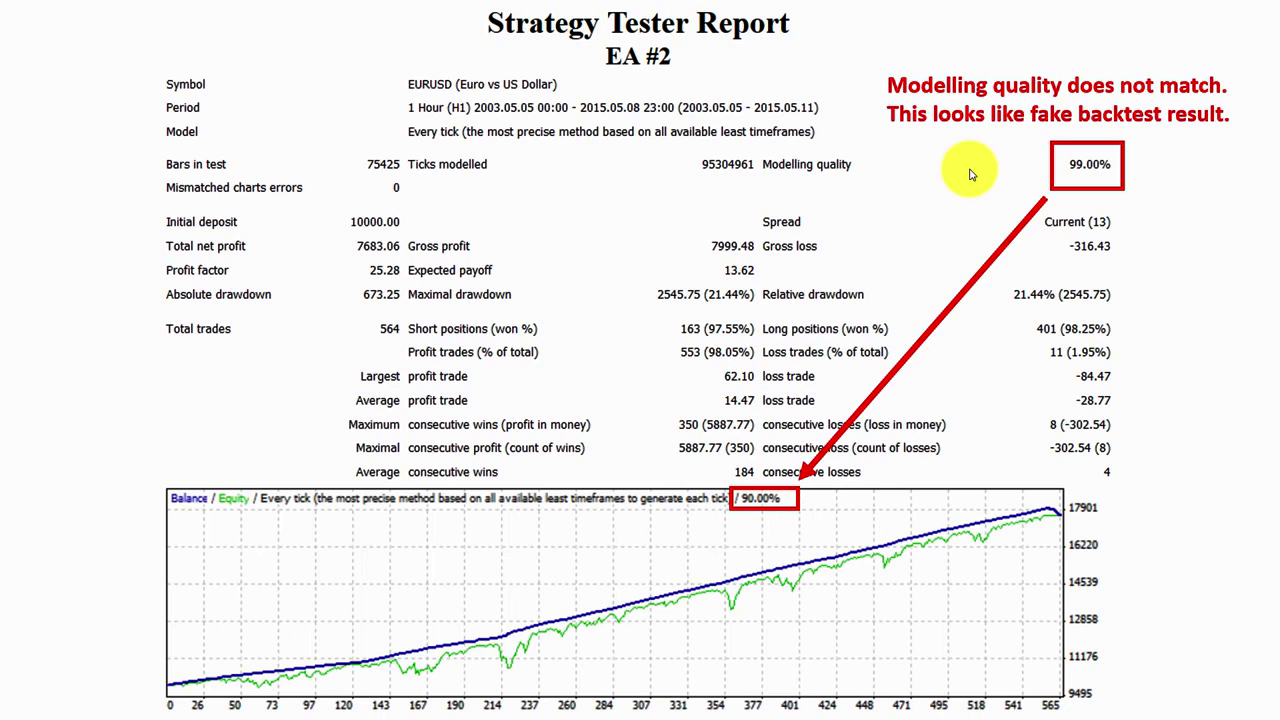
Backtesting uses historical data to evaluate how your EA would have performed in the past. This is your first validation step and helps identify obvious problems before more expensive testing phases.
🎯 Phase 1 Objectives
Duration: 1-2 weeks- Validate EA logic and strategy
- Identify obvious performance issues
- Optimize basic parameters
- Ensure code stability
- Generate baseline performance metrics
📈 Backtesting Best Practices
- Use Quality Data: Download complete, clean historical data
- Test Multiple Periods: Include trending and ranging market conditions
- Realistic Spreads: Use actual broker spreads, not zero spreads
- Commission Inclusion: Add realistic commission costs
- Slippage Simulation: Account for execution delays
- Out-of-Sample Testing: Reserve data for final validation
⏱️ Testing Period Requirements
Years minimum historical data
Minimum number of trades
Quarterly periods for analysis
Different market conditions
📊 Key Backtesting Metrics
| Metric | Minimum Acceptable | Good Performance | Excellent Performance |
|---|---|---|---|
| Win Rate | 50-55% | 55-65% | 65%+ |
| Profit Factor | 1.1-1.3 | 1.3-1.5 | 1.5+ |
| Maximum Drawdown | 20-30% | 15-20% | <15% |
| Sharpe Ratio | 0.5-1.0 | 1.0-1.5 | 1.5+ |
| Recovery Factor | 2-3 | 3-5 | 5+ |
🔧 Backtesting Setup Process
Step 1: Data Preparation
- Open Strategy Tester in MT4/MT5
- Select your EA from the Expert Advisor dropdown
- Choose the currency pair to test
- Select the timeframe (recommend H1 or H4)
- Set date range (minimum 1 year, preferably 2+ years)
Step 2: Model Configuration
- Model: "Every tick" for most accurate results
- Deposit: Set initial account balance
- Leverage: Match your intended leverage
- Currency: Set account currency
- Optimization: Set to OFF for initial testing
Step 3: EA Parameters
- Load default settings or recommended parameters
- Set lot size to 0.01 for conservative testing
- Configure magic number for tracking
- Set risk parameters (stop loss, take profit)
- Enable/disable specific features as needed
📋 Backtesting Results Analysis
- Perfect Performance: Likely curve-fitted strategy
- Zero Drawdown: Unrealistic in live trading
- Excessive Trades: Potential overtrading
- Poor Performance: Strategy may not be viable
- Inconsistent Results: May not translate to live markets
🚀 Phase 2: Forward Testing
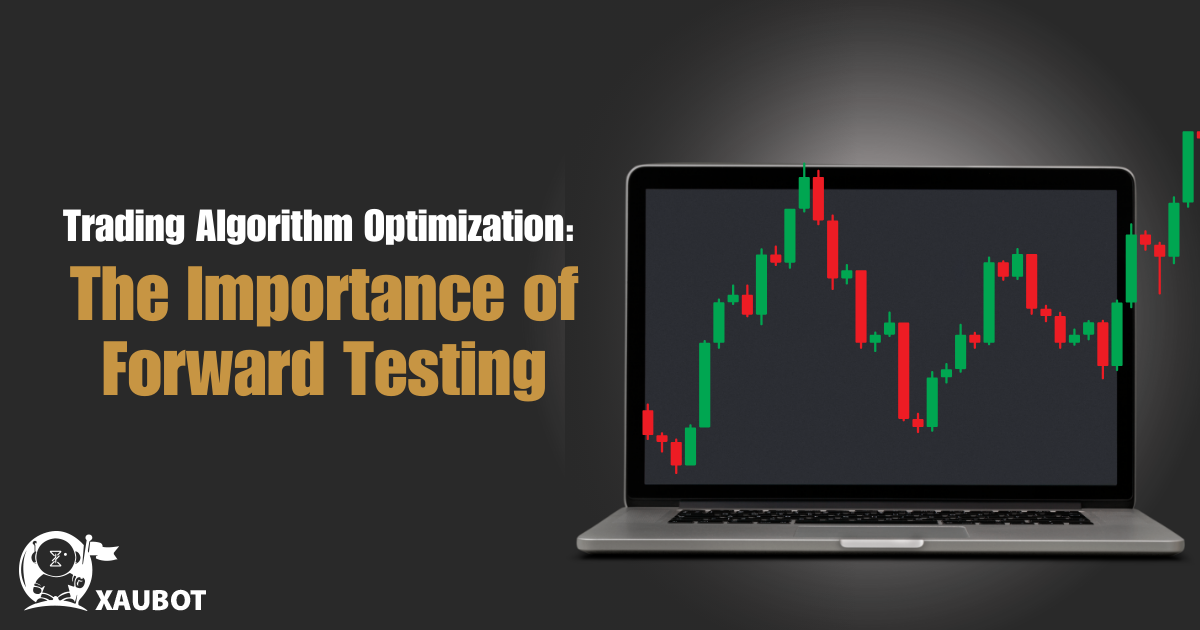
Forward testing evaluates your EA in real-time market conditions using demo accounts. This phase bridges the gap between historical performance and live trading reality.
🎯 Phase 2 Objectives
Duration: 2-3 months- Validate backtest results in live market conditions
- Test EA reliability over time
- Identify issues not visible in backtests
- Build confidence for live trading
- Gather performance data for analysis
📱 Demo Account Setup
🏦 Broker Selection
- Use Same Broker: As planned for live trading
- Realistic Spreads: Match live account spreads
- Standard Conditions: Same leverage and account type
- Sufficient Balance: $10,000+ for meaningful results
- Platform Version: Same MT4/MT5 build
⚙️ Forward Testing Configuration
| Setting | Configuration | Reason | Notes |
|---|---|---|---|
| Lot Size | 0.01 (micro lots) | Conservative approach | Start small, can increase later |
| Risk Per Trade | 0.5-1% of account | Preserve capital | Conservative for testing |
| Max Simultaneous Trades | 1-3 positions | Limit exposure | Reduce complexity |
| Trading Hours | Optimal market sessions | Focus on best conditions | Avoid low liquidity periods |
| EA Monitoring | Daily check minimum | Track performance | Identify issues early |
📊 Forward Testing Monitoring
- Open Positions: Check all active trades
- Account Balance: Monitor equity changes
- Drawdown Level: Track maximum drawdown
- Trade Log: Review recent trade history
- EA Status: Verify EA is running properly
- Error Logs: Check for any technical issues
📋 Forward Testing Metrics
Review periods for performance assessment
Minimum trades per month for validation
Acceptable backtest-to-demo performance ratio
Maximum monthly drawdown during testing
📱 Phase 3: Demo Validation
Demo validation is similar to forward testing but focuses specifically on comparing results between different demo accounts to ensure consistency.
🎯 Phase 3 Objectives
Duration: 1 month- Verify performance consistency across brokers
- Validate EA behavior with different spread conditions
- Test execution quality variations
- Ensure EA works with different platforms
- Final validation before live testing
🏦 Multi-Broker Testing
Test your EA on 2-3 different broker demo accounts simultaneously to identify:
- Spread Impact: How different spreads affect profitability
- Execution Quality: Slippage and order filling differences
- Platform Stability: Consistent EA behavior across platforms
- Hidden Costs: Different commission structures
- Customer Support: Broker service quality for EA traders
💰 Phase 4: Small Live Test
The small live test is your final validation before full deployment. Use minimal position sizes to test execution quality and real-world performance.
🎯 Phase 4 Objectives
Duration: 1 month- Validate real execution quality
- Test live market conditions impact
- Verify EA performance matches demo results
- Identify live trading-specific issues
- Build final confidence for scaling
💵 Live Testing Guidelines
- Minimal Position Size: Use 0.01 lots (micro account)
- Limited Risk: Maximum 1% account risk
- Short Duration: 1 month testing period
- Daily Monitoring: Check results daily
- Document Everything: Keep detailed trading journal
- Set Exit Rules: Clear criteria for stopping test
📊 Live Test Success Criteria
| Criteria | Acceptable Range | Good Performance | Action if Failed |
|---|---|---|---|
| Win Rate | Within 10% of demo | Matches demo exactly | Investigate execution issues |
| Profit Factor | 0.8-1.2 of demo | 0.9-1.1 of demo | Review spread impact |
| Drawdown | Within 20% of demo | Matches demo drawdown | Check risk management |
| Trade Frequency | Within 15% of demo | Matches demo frequency | Verify market conditions |
📈 Performance Metrics Analysis
Understanding and analyzing performance metrics is crucial for making informed decisions about EA deployment and optimization.
🎯 Core Performance Indicators
📊 Profitability Metrics
- Total Return: Overall percentage gain/loss
- Monthly Return: Average monthly performance
- Annual Return: Projected annual performance
- Profit Factor: Gross profit ÷ Gross loss
- Expectancy: Average profit per trade
⚠️ Risk Metrics
- Maximum Drawdown: Largest peak-to-trough decline
- Current Drawdown: Current losing streak
- Recovery Factor: Net profit ÷ Maximum drawdown
- Risk of Ruin: Probability of account loss
- Value at Risk (VaR): Maximum expected loss
📈 Efficiency Metrics
- Sharpe Ratio: Risk-adjusted returns
- Sortino Ratio: Downside risk-adjusted returns
- Calmar Ratio: Return ÷ Maximum drawdown
- Trade Frequency: Trades per time period
- Average Trade Duration: Hold time per trade
📊 Performance Analysis Template
🔧 Optimization vs Validation
Understanding when to optimize and when to validate prevents common mistakes that lead to curve-fitting and poor live performance.
⚙️ Optimization Phase
- Before Forward Testing: Optimize initial parameters
- Performance Decline: When EA underperforms expectations
- Market Changes: When market conditions change significantly
- New Versions: When updating EA software
- Quarterly Reviews: Regular performance optimization
✅ Validation Phase
- During Forward Testing: No optimization allowed
- Live Testing Phase: Must use validated settings
- Performance Verification: Confirm EA works as expected
- Broker Comparisons: Same settings across brokers
- Regular Monitoring: Check if settings still optimal
🚫 Avoid Over-Optimization
- Perfect Backtest Results: Unrealistic performance claims
- Too Many Optimized Parameters: More than 5-7 variables
- Out-of-Sample Failure: Poor validation results
- Parameter Sensitivity: Small changes cause big differences
- Market-Specific Fit: Only works in specific conditions
🚫 Common Testing Mistakes
Learning from common testing mistakes saves time, money, and prevents deploying unprofitable EAs.
❌ Top 10 Testing Mistakes
❌ Mistakes to Avoid:
🚀 Advanced Testing Techniques
Advanced testing methods provide deeper insights and more robust validation of EA performance.
🔬 Monte Carlo Simulation
Run multiple simulations with randomized trade sequences to understand:
- Performance Distribution: Range of possible outcomes
- Risk Assessment: Maximum possible drawdown
- Probability Analysis: Chance of different performance levels
- Sensitivity Analysis: How changes affect results
- Stress Testing: Performance under adverse conditions
📊 Walk-Forward Analysis
🔄 Walk-Forward Process
- Optimization Period: Optimize parameters on historical data
- Walk-Forward Period: Test optimized settings on next period
- Sliding Window: Move forward and repeat process
- Performance Analysis: Evaluate consistency across periods
- Parameter Stability: Check for reasonable parameter ranges
🎯 Market Condition Testing
| Market Condition | Characteristics | Testing Focus | Success Criteria |
|---|---|---|---|
| Strong Trends | Clear directional movement | Trend following performance | Profitable in trending periods |
| Range-Bound | Sideways price movement | Mean reversion strategies | Avoids major drawdowns |
| High Volatility | Large price swings | Risk management effectiveness | Controls drawdown properly |
| Low Volatility | Small price movements | Profit capture efficiency | Still generates reasonable returns |
🛠️ Testing Tools & Software
Various tools and software can enhance your testing process and provide better insights into EA performance.
📊 Built-in Testing Tools
MetaTrader Strategy Tester
- Backtesting: Historical data testing
- Optimization: Parameter optimization
- Multi-Threading: Faster testing (MT5)
- Visual Mode: See trades being placed
- Report Generation: Detailed performance reports
🔧 Third-Party Tools
MultiTrader
Advanced backtesting and optimization platform
Forex Tester
Historical forex data testing software
TradingView
Strategy testing and analysis platform
QuantConnect
Algorithmic trading platform with backtesting
❓ Frequently Asked Questions
Get answers to the most common questions about testing forex robots and Expert Advisors.
🤔 Testing Strategy Questions
A: Minimum 4-6 months total testing: 1-2 weeks backtesting, 2-3 months forward testing, and 1 month small live test. Some EAs may require longer testing periods.
Q: Can I skip backtesting and go straight to demo testing?
A: No, backtesting is essential for validating strategy logic and identifying obvious problems before investing time in forward testing.
Q: What if my EA performs differently in demo vs backtest?
A: Some variance (10-20%) is normal due to market condition changes and execution differences. Larger differences require investigation and potentially re-optimization.
Q: How do I know if my EA is curve-fitted?
A: Signs include perfect backtest results, poor forward performance, extreme parameter sensitivity, and performance that only works in specific market conditions.
⚙️ Technical Testing Questions
A: Test on the platform you'll use for live trading. MT5 has better backtesting capabilities, but MT4 has more EA availability and proven track record.
Q: How important is data quality for testing?
A: Extremely important. Poor data quality leads to unreliable results. Always use high-quality, clean historical data from reputable sources.
Q: Can I test multiple EAs simultaneously?
A: Yes, but ensure adequate capital and monitor total risk exposure. Consider correlation between different EAs to avoid over-concentration.
Q: What spread should I use for testing?
A: Use realistic spreads that match your broker's actual spreads. Testing with zero or very low spreads will give unrealistic results.
💰 Performance and Money Questions
A: Realistic expectations: 15-30% annual returns with 10-20% maximum drawdown for conservative strategies. Higher returns typically come with higher risk.
Q: How much should I risk during testing phases?
A: Backtesting: any amount, Demo testing: $10,000+ virtual, Small live test: maximum 1% of actual capital.
Q: When should I stop testing an EA?
A: Stop if: consistent losses over 3+ months, maximum drawdown exceeds limits, strategy no longer works in current market conditions, or technical issues persist.
Q: Can I modify my EA during testing?
A: Only during optimization phases. Once in validation (forward/live testing), use consistent settings to get reliable results.
📚 Conclusion
Proper testing is the cornerstone of successful automated trading. A systematic approach that includes backtesting, forward testing, demo validation, and small live testing helps ensure your EA will perform reliably in live markets.
• Never skip testing phases - each validates the previous
• Use realistic conditions - spreads, slippage, and market conditions
• Focus on risk management - limit drawdown and position sizes
• Document everything - maintain detailed records for analysis
• Be patient - adequate testing prevents costly mistakes
Remember that testing is an investment in your trading success. The time spent on thorough testing is minimal compared to the potential losses from deploying an unproven EA. Take your time, follow the systematic approach, and build confidence in your EA before risking real capital.
Follow this testing framework to validate your forex robot thoroughly. Remember: a well-tested EA today prevents costly mistakes tomorrow.
📈 Continue Your EA Journey:
← Best Free Forex EAs |
→ Creating Your First EA |
← Forex Robots
Introduction
Comments
Post a Comment